How to Find Fishing Spots with Google Earth and Navionics
If you want to find promising fishing spots before you ever launch the boat, you do not have to rely entirely on trial and error. One of the methods I used while bass fishing tournaments in Oklahoma was to combine Navionics with Google Maps and Google Earth Pro. Each tool shows you something different, and together they can reveal structure, depth changes, cover, and even old structures that are almost impossible to see when a lake is at normal pool.
This approach can be used for bass or adapted to just about any species. The key is knowing what type of structure and cover your target fish prefer, then using the maps to narrow down the places worth checking on the water.
Why Use Google Earth and Navionics Together?
Navionics gives you a look at what is happening underwater. I use it to identify depth changes, points, channels, humps, flats, and places where deep water is close to shallow water.
Google Maps and Google Earth give you the view from above. That can reveal flooded timber, laydowns, rocks, docks, old foundations, creek channels, and other cover that may not be obvious from a normal lake-level image.
The real advantage comes from comparing the two. I am not looking at a map and saying, “That looks like a good fishing spot.” I am looking for a reason for the spot to be good.
Start with Navionics
When I open Navionics, I am first looking for areas where fish can move between different depths without traveling a long distance. A river channel that swings close to a shallow point is a good example.
Pay attention to contour lines. When the lines are packed tightly together, you are looking at a steeper drop. A point, flat, or other shallow area that quickly falls into deeper water can be worth investigating.
River-channel bends are especially interesting when the channel brushes against a point, bank, or other shallow area. I would not automatically stop and fish every one of these locations, but I would definitely investigate them with my electronics when I am on the water.
The important part is that the depth change is only the beginning. I want to find something for the fish to actually use—brush, flooded timber, a laydown, rocks, a dock, an old foundation, or some other piece of cover or structure.
Use Satellite Imagery to Find What the Map Does Not Show
Once I find an interesting feature in Navionics, I switch over to satellite imagery and look at the same area from above.
This is where things can get interesting. A shallow point may look completely ordinary on the map, but satellite imagery taken when the lake is low can reveal trees, laydowns, rocks, old roads, foundations, or other features that are normally underwater.
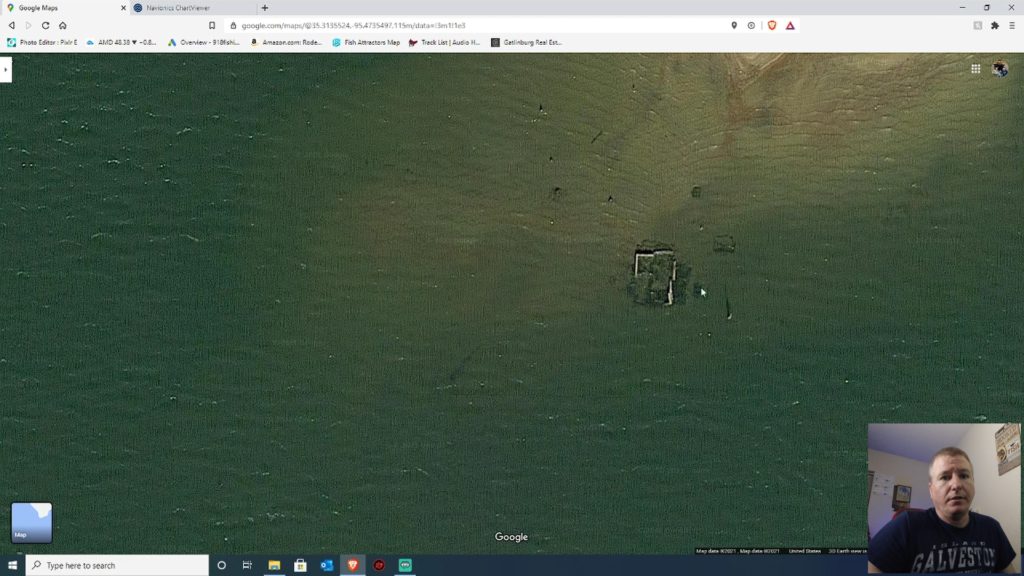
In the video that accompanies this article, I found an example of an old foundation on a point. At normal water levels you would have very little reason to know it was there. Looking at the lake when the water was down exposed the outline of the old structure.
That is exactly the kind of information I am looking for: something that gives an otherwise ordinary-looking location a reason to be there.
Google Earth Pro Makes Historical Imagery Even More Useful
If you really want to dig into this technique, Google Earth Pro is especially useful because you can look at historical satellite imagery.
In Google Earth Pro, the historical imagery tool lets you move through available images from different dates. Lake levels change, vegetation changes, and structures become visible at different times. A lake that looks completely normal today may have an older image showing the bottom, timber, roads, foundations, or other structure that is now hidden.
You will not necessarily have a perfect low-water image for every lake or every location, but when you find one, it can be extremely valuable.
Save Your Discoveries as Waypoints
When I find something interesting, I do not trust myself to remember exactly where it was. I mark it.
Google Earth Pro lets you create waypoints and organize them so you can return to the location later. I also use Google Earth Pro to keep copies of waypoints from my fish finders. That gives me a central place to keep information that I have collected over time instead of relying entirely on the memory or storage of one electronics unit.
Those waypoints can also be exported. Depending on your fish finder and the file format it uses, you may need to convert the file before loading it into your electronics. In the video I mention GPS Babel, which can convert many GPS file formats.
Do Not Ignore Small Features
One of the biggest mistakes when looking at these maps is assuming that a feature has to be large to matter.
A small point, a little hump, a few trees, a dock sitting away from other cover, or a subtle contour change can be enough to make an area worth investigating—especially when it is close to deeper water.
For example, I found a point that did not look particularly impressive at first. It was relatively shallow and did not appear to have much going for it. But when I compared the satellite imagery with Navionics, I found flooded timber and other cover right near the drop into deeper water. That changes the way I look at the location.
This Works for More Than Bass
I originally developed this approach while looking for bass tournament spots, but the idea is not limited to bass.
Think about what your target species uses throughout the year. Does it prefer brush, rock, timber, channel edges, points, flats, creek channels, or quick access to deeper water? Once you know what you are looking for, you can use the same process to find potential locations for other species.
The fish may change, but the basic process stays the same: identify useful underwater features, compare them with what you can see from above, and save the locations that deserve a closer look.
Putting It All Together
My basic workflow looks like this:
- Open Navionics and look for promising underwater features.
- Focus on depth changes, points, channels, flats, humps, and areas where deep water is close to shallow water.
- Switch to Google Maps or Google Earth and examine the same location from above.
- Look for visible cover and structure such as timber, laydowns, rocks, docks, roads, foundations, or other unusual features.
- Use Google Earth Pro historical imagery when available to look for lower water levels or older images.
- Mark the locations that look worth investigating.
- When you get on the water, use your electronics to verify what is actually there.
The goal is not to replace time on the water. It is to make that time more productive. Instead of launching with no plan and hoping to stumble across fish, you can arrive with a list of places that have a reason to be worth checking.
Watch the Full Google Earth and Navionics Fishing Tutorial
I walk through this process in the video below, including examples from Oklahoma lakes and the old foundation I found using this method.
Watch the Google Earth Pro and Navionics fishing tutorial on YouTube.
I also made a follow-up tutorial showing how I use additional public information and move waypoints toward my fish-finding electronics. If you are interested in building your own library of fishing spots, that is the next step I recommend.
For more practical fishing tutorials, visit our Fishing Tips & How-To section.
Have you used Google Earth or Navionics to find a fishing spot before you ever got on the water? Let us know what you found.
One Comment