How to Use Depth Shading to Find Fish Faster
One of the easiest ways to make a fish finder more useful is to stop treating the map as decoration. Depth shading can help you quickly identify changes in water depth and narrow down the areas that are worth fishing first.
What Is Depth Shading?
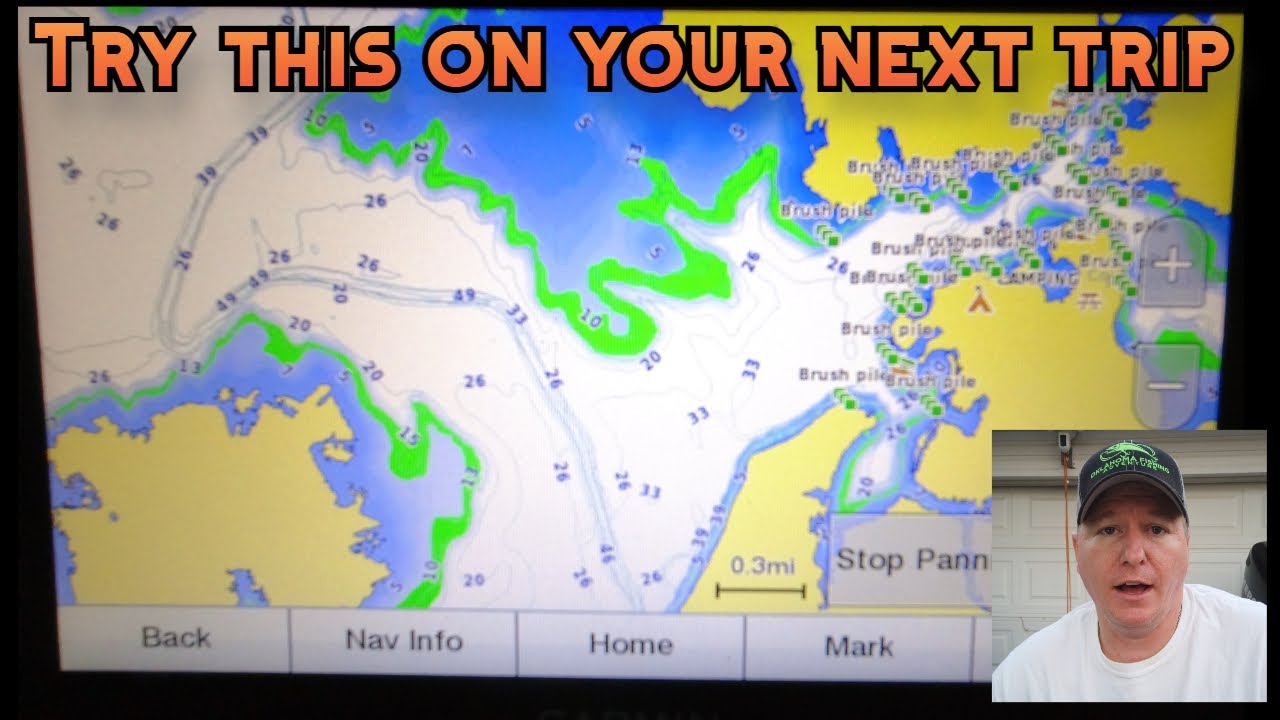
Depth shading uses different colors or shades on a digital lake map to make depth ranges easier to see. Instead of reading every contour line individually, you can look at the map and immediately spot shallow flats, deeper water, breaklines, channels, and transitions.
The exact colors and controls vary by fish finder and mapping system, but the idea is the same: make depth changes easier to recognize before you start casting.
Why Depth Changes Matter
Fish do not always spread evenly across a lake. Changes in depth can create travel routes, feeding areas, ambush points, and places where fish can move between shallow and deep water.
Depth shading does not tell you that fish are definitely present. It helps you eliminate large amounts of water that are less likely to fit the pattern you are looking for.
Use the Season and Conditions With the Map
Depth is only one piece of the puzzle. Time of year, water temperature, weather, current, forage, and the species you are targeting all affect where fish may position.
For example, a shallow area may be important during one seasonal pattern while nearby deeper water becomes more useful under different conditions. Use depth shading to identify possibilities, then let the conditions help you decide which ones deserve your time.
How to Use Depth Shading on the Water
- Start with the depth range you expect your target species to use.
- Scan the map for areas where that depth intersects with points, channels, flats, creek arms, or other structure.
- Look for sharp depth changes and transitions rather than simply searching for the deepest water.
- Compare the map with current conditions and seasonal behavior.
- Use your electronics to investigate the most promising areas instead of running randomly across the lake.
- Save productive locations as waypoints so you can return to them later.
Depth Shading Can Save Fishing Time
If you do not get unlimited time on the water, efficiency matters. A map with useful depth shading lets you do more homework before making a cast and gives you a systematic way to decide where to start.
That does not mean every shaded area will produce fish. It means you are making educated choices instead of fishing every piece of water the same way.
Combine Depth Shading With Google Earth
Depth maps and satellite imagery can work together. Google Earth can help reveal visible structure, old channels, points, creek arms, and changes in the shoreline, while your fishing map provides the depth information that satellite imagery cannot show by itself.
We also have a full guide on how to find fishing spots with Google Earth and Navionics.
Use Waypoints to Build Your Own Fishing Map
Once you find productive locations, save them. Over time, your waypoints become a personal database of places that match particular conditions, seasons, species, and techniques.
That is especially useful when you fish the same Oklahoma lakes repeatedly. Instead of starting from zero every trip, you can use what you learned previously and refine the pattern.
Watch the Original Video
In the original Oklahoma Fishing Adventure video, we show how we use depth shading to eliminate unproductive water and narrow down the areas we want to investigate.
Watch: Find New Fishing Spots Using Depth Shading Techniques!
Final Thoughts
Depth shading is not a magic fish finder setting, but it is a powerful way to make a lake map easier to understand. Use it with seasonal patterns, weather, water temperature, structure, and waypoints, and you can spend less time fishing dead water and more time concentrating on areas that make sense.